Documentation used to have one primary interface: a page read by a person.
That page may also have been indexed by search, copied into an issue, or shown inside an IDE, but its structure was still designed around human navigation. Coding agents change that assumption. They need to discover the right documentation, retrieve a small relevant part, understand its version, and turn it into code without loading an entire website into context.
This does not make human documentation less important. It means documentation now has another consumer—and that consumer behaves more like an API client than a reader.
The Stale-Knowledge ProblemPermalink to this section
Language models are good at recalling common component APIs. They are much less reliable when a library has recently changed a prop, replaced a component, or introduced a new pattern.
While building an MCP server for Nuxt UI, I tested a refactor involving FormGroup. The model initially suggested the older v2 API from memory. It then queried the MCP server, found the current component documentation and examples, and corrected the implementation.
The interesting part was not that the model had been wrong. Stale knowledge is inevitable. The useful behaviour was giving it a dependable way to notice uncertainty and retrieve the current answer.
Search can sometimes solve this, but general web search has weak guarantees around library version, canonical sources, and the relationship between prose and source code. A documentation interface can do better.
Give Agents Small, Intentional ToolsPermalink to this section
The Nuxt UI MCP contribution exposed focused tools for the tasks a coding agent actually performs:
- List available components and their categories.
- Retrieve a component's source and metadata.
- Retrieve a working component demo.
- Inspect props, slots, and events.
- List available templates.
- Retrieve the details of a template.
- Search the documentation.
- Inspect the relevant repository structure.
This is deliberately different from a single get_all_docs tool.
A model usually does not need every component, every example, and the full migration guide. It needs the Button API, one Modal example, or the current way to structure a form. Smaller tools produce smaller responses, make intent observable, and let the server cache resources according to how often they change.
The hosted server supports HTTP and Server-Sent Events transports, with caching around component source, templates, and documentation. Transport is not the product, though. The product is a reliable question-and-answer boundary over the library's canonical material.
Structure Once, Publish to Several InterfacesPermalink to this section
Maintaining a separate set of “AI documentation” would quickly create the same stale-knowledge problem inside the repository.
A better architecture starts with structured source material and derives several interfaces from it:
Route through / Website
Browse the documentation in context
- For
- People
- Job
- Guided reading
- Returns
- Navigation, examples and visual hierarchy
Every answer retains the source version
A single versioned source of Markdown, component metadata, examples, and source code feeds three interfaces. The website provides guided reading for people. llms.txt provides a discovery map for coding agents. MCP provides bounded retrieval for coding agents. Every interface points back to the same revision.
The website can add navigation, interactive examples, syntax highlighting, and visual hierarchy. llms.txt can provide a discoverable map of the important material. MCP can expose narrow retrieval operations. All three should point back to the same component names, examples, and API metadata.
That shared source is more important than any particular protocol.
Rebuilding the Documentation PlatformPermalink to this section
We made the same idea part of Nord Design System's documentation architecture.
The Nord documentation rewrite moved the site from Eleventy to Nuxt 4 and Nuxt Content. Alongside the human-facing site, it added server routes for component metadata, examples, navigation, and assets; full-text search; syntax highlighting; sitemap generation; and public llms.txt support.
I also added Nord's public Working with AI support. It brings llms.txt and agent skills into the same documentation platform, giving assistants structured access to component APIs, examples, design tokens, and usage guidance without maintaining a second AI-only source.
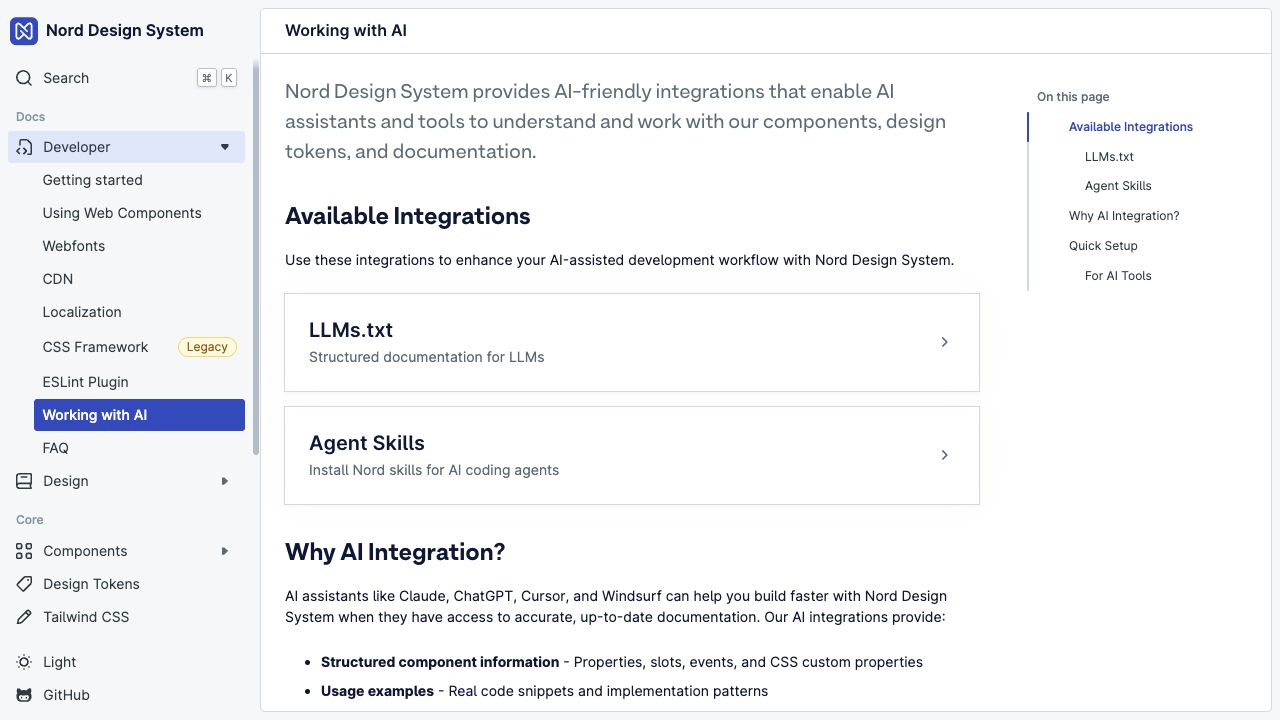
The rewrite was not only a framework upgrade. It established a platform from which the same documentation could support:
- developers reading guides and examples
- designers editing structured content
- IDE and community integrations
- search and metadata endpoints
- coding agents using skills or MCP
Once content is addressable as structured data, new interfaces do not require duplicating the documentation itself.
llms.txt, Skills, and MCP Solve Different ProblemsPermalink to this section
These formats are often grouped together, but they operate at different levels.
llms.txt provides discoveryPermalink to this section
It gives a model a concise map of the site and points toward canonical resources. It is useful when an agent can fetch web content but does not already know the documentation structure.
Skills provide procedurePermalink to this section
A skill can explain how to apply the system: which component to prefer, how to compose patterns, what constraints to preserve, and where to look next. It turns reference material into an operational workflow.
MCP provides retrieval and actionsPermalink to this section
An MCP server exposes explicit capabilities with typed inputs and bounded outputs. It is appropriate when an agent needs to search, inspect metadata, or fetch one resource repeatedly during implementation.
The three can reinforce each other. None of them compensates for inaccurate source documentation.
Design the Documentation Like a Public InterfacePermalink to this section
Thinking of documentation as an API changes the questions we ask.
Is every concept addressable?Permalink to this section
A page title visible in a navigation menu is not enough. Components, examples, templates, and migration guides need stable identifiers that tools can retrieve directly.
Can a consumer ask a narrow question?Permalink to this section
If the only interface returns a megabyte of Markdown, every agent must build its own search layer. Focused operations such as get_component_demo make the intended access pattern clear.
Is version information preserved?Permalink to this section
An accurate answer for v2 can be a broken answer for v4. Generated metadata and examples should come from the same revision as the installed package whenever possible.
Can the answer be verified?Permalink to this section
Examples should be buildable, component metadata should be generated from source, and links should resolve. A fluent response is not evidence that the retrieved material is valid.
Are the boundaries honest?Permalink to this section
Documentation tools should return documentation. They should not silently invent product-specific architecture, business rules, or security decisions that belong to the consuming application.
What Not to DoPermalink to this section
Several shortcuts make an impressive demo but a weak documentation system:
- dumping the entire documentation site into every prompt
- copying examples into a separate AI-only repository
- relying on model memory for fast-moving APIs
- exposing one unbounded search tool with inconsistent output
- publishing generated metadata without testing it against the package
- treating an MCP server as a replacement for navigable human documentation
Agents make information architecture more visible. Ambiguous naming, duplicate examples, missing versioning, and undocumented behaviour become retrieval problems very quickly.
Documentation Is Part of the Runtime ExperiencePermalink to this section
For a developer using a component library, the practical interface is not only the JavaScript package. It is the package, types, examples, migration guidance, editor feedback, and now the information available to their coding agent.
Designing those surfaces from one structured source gives people better documentation and gives agents a way to correct their own stale assumptions.
The goal is not to write documentation for robots. It is to make the knowledge behind a system precise enough that every consumer can ask for the right part and receive a current, verifiable answer.